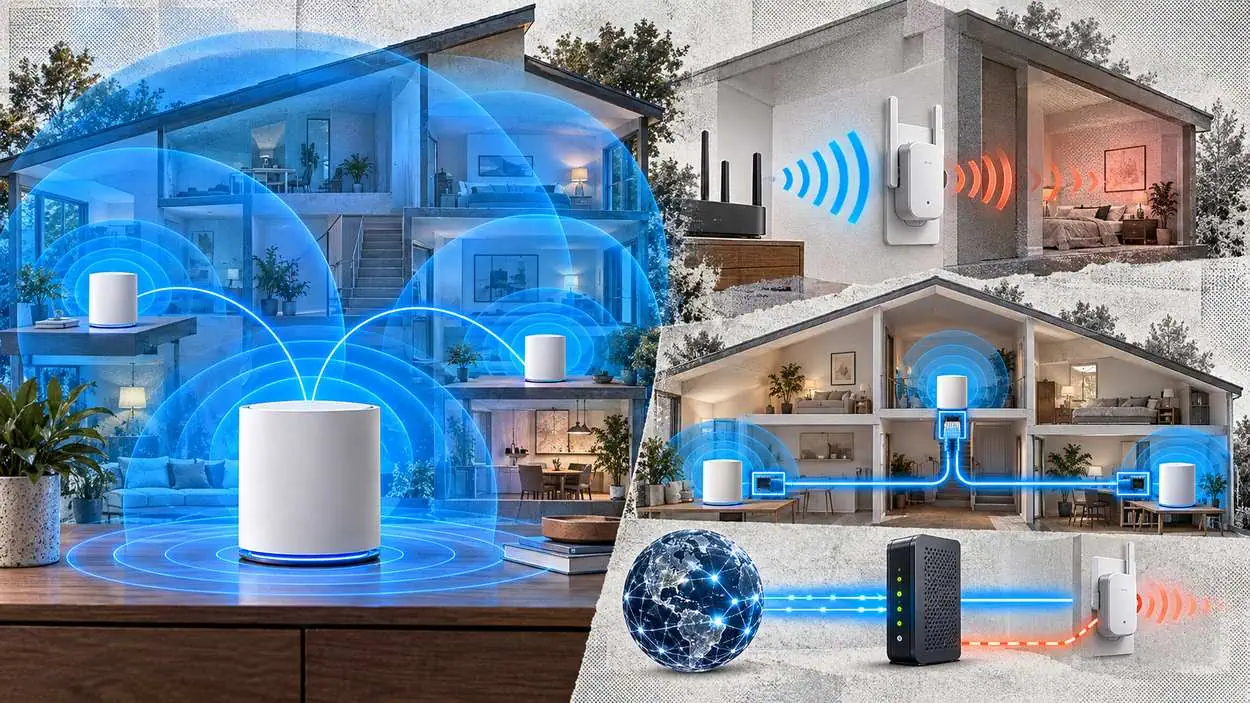






TP-Link sets the starting point for a mesh Wi-Fi system at one node per 1,500 to 2,000 square feet, and Google tells its mesh owners not to include more than 5 routers or points in a mesh network. In the mesh Wi-Fi vs Wi-Fi extender choice, the extender takes a simpler route: It picks up the wireless signal from your router and rebroadcasts it.
According to TP-Link, a device connected to the extender goes through an extra wireless hop, so its speed is slower than a device on the main router. Neither option increases the internet speed coming into your home, which is determined by your internet service provider and plan. The useful comparison is how each one carries the signal you already pay for: the hop count, the backhaul, the number of network names, and the layout of the rooms that need coverage.
Key Takeaways
- According to TP-Link, the starting point for mesh is one node per 1,500 to 2,000 square feet, though thick walls, multiple floors, and large open areas all influence how far each node’s signal reaches.
- Google advises no more than 5 routers or points in a mesh network, because adding more might be detrimental to Wi-Fi performance.
- Google’s US store rates the Nest Wifi Pro at up to 2,200 square feet per router, noting that router placement and home size, materials, and layout can affect how Wi-Fi signal travels.
- According to Linksys, its Cross Band feature lets a device receive on one channel and transmit on another across the 2.4 GHz and 5 GHz bands, instead of taking turns on the same frequency.
- Google lists the Nest Wifi Pro as able to handle up to 100 connected devices per point.
Editor’s Choice
- Nest Wifi Pro packs: up to 4,400 square feet for a 2-pack and up to 6,600 square feet for a 3-pack.
- Devices on a 3-pack: up to 300 devices in a 3-pack network, per Google.
- TP-Link’s rule at five nodes: A home of 10,000 square feet reaches 5 nodes at TP-Link’s 2,000-square-foot end, Google’s advised maximum for a Nest mesh.
- Single-band extender link: Linksys says forcing 2.4 GHz only between extender and root will slow down communication for devices connecting to the range extender on the 2.4 GHz band.
- Newer standards: Google says Wi-Fi 6E is up to 2x faster than Wi-Fi 6, and TP-Link says the performance gap narrows with newer Wi-Fi 6 and Wi-Fi 7 extenders.
What is mesh Wi-Fi and how does backhaul work?
A mesh system links several units into one network, and per the Wi-Fi Alliance, Wi-Fi EasyMesh networks employ multiple APs that work together to form a unified network and can guide devices to the best AP. It works like one router spread across the house.
TP-Link adds that the nodes communicate using a dedicated connection called a backhaul, either a wireless signal between nodes or a wired Ethernet connection.
The main unit connects to your modem, and additional units called nodes are placed around your home. Devices stay on one network name, called an SSID, and connect automatically to the strongest node as you move between rooms. TP-Link calls that handoff seamless roaming, and it’s the key difference from a range extender.
The backhaul is the link between mesh nodes. ASUS says that under its Ethernet Backhaul Mode, you are able to release more wireless bandwidth for end devices to connect. A wired link between nodes takes the node-to-node traffic off the air, which leaves the radios free for phones and laptops.
Mesh also comes in competing flavors. EasyMesh is a standardized Wi-Fi Mesh technology based on an open-source architecture, allowing devices from different brands to work together, while OneMesh is a proprietary mesh technology developed exclusively by TP-Link. Setup still matters: A poorly placed node will deliver results similar to a poorly placed extender.
 Pros
Pros One network name across every node.
- Devices hand off to the strongest node automatically.
- Nodes can link over Ethernet where cable exists.
- Standards-based EasyMesh gear can mix brands.
 Cons
Cons More hardware than a single extender.
- Replaces the existing router as the main unit.
- Node placement still decides performance.
- Proprietary systems lock you into one brand.
An extender takes a different route to the same dead zone, and that route costs speed.
How a Wi-Fi Extender Works and Why It Loses Speed
An extender is slower for Wi-Fi devices because, per TP-Link, the more wireless hops, the slower the speed would be. A client on the range extender goes through an extra wireless hop, but there will be no speed difference if the client is wired to the range extender.
Range extenders work by picking up the wireless signal from your router and rebroadcasting it using powerful amplifiers and antennas. TP-Link’s blog explains the cost: Because the extender uses part of its bandwidth to receive the signal before rebroadcasting it, speeds are typically lower than a direct connection to your router. That matters most for streaming gear in far rooms, from TVs to the smart speakers many homes place on other floors.
Dual-band designs try to soften that. Linksys says its Cross Band feature maximizes the simultaneous use of both bands (2.4 GHz and 5 GHz), so instead of taking turns to transmit on the same frequency, both clients can transmit at the same time but on different bands. The band choice ties into the wider 2.4 GHz vs 5 GHz Wi-Fi band trade-offs.
Pros- Adds coverage without replacing the router.
- One box for one weak area.
- A wired device on the extender keeps its speed.
- Cross Band models use both bands at once.
Cons- Wi-Fi clients go through an extra wireless hop.
- Some models create a second network name.
- Devices may not switch to the stronger signal on their own.
- Placement is a balance between router signal and coverage.

Do Wi-Fi extenders slow down your internet?
Yes, for devices connected over Wi-Fi. TP-Link says you might not be able to get the same speed as the main router when you are using the range extender due to the distance and limitations of Wi-Fi. The actual speed will vary with building materials, obstacles, and the volume and density of traffic, and a wired device on the extender avoids the extra hop.
Where should I put a Wi-Fi extender?
TP-Link advises you to place the range extender about halfway between your router and the area with a poor signal. Range extenders can experience interference from obstacles such as concrete walls, metal objects, and microwaves.
Mesh Wi-Fi vs Wi-Fi Extender: Side-by-Side Comparison
According to TP-Link, some extenders create a second network name when they rebroadcast your router’s signal, and mesh devices connect automatically to the strongest node. For its Nest and Google Wifi systems, Google advises no more than 5 routers or points in one mesh.
| Dimension | Mesh Wi-Fi system | Wi-Fi extender |
|---|---|---|
| How it extends coverage | Multiple nodes create one single, unified network | Picks up the router’s signal and rebroadcasts it |
| Network name | One network name, called an SSID | Some extenders create a second network name |
| Moving between rooms | Connects automatically to the strongest node | May not automatically switch to the stronger connection |
| Speed path | ASUS: Ethernet backhaul releases more wireless bandwidth for end devices | An extra wireless hop for Wi-Fi clients |
| Incoming internet speed | Not increased | Not increased |
| Size guidance | No more than 5 routers or points in a Google mesh | About halfway between router and weak area |
| Upkeep | Latest firmware from the manufacturer’s website | Latest firmware from the manufacturer’s website |
Source: TP-Link, Google, ASUS, CISA
The upkeep row deserves a second look. A three-node mesh is three router-class devices on the home network, and each one carries the factory settings and firmware it shipped with.
By the numbers: TP-Link starts mesh planning at one node per 1,500 to 2,000 square feet, Google advises no more than 5 routers or points in a mesh network, and TP-Link says neither option increases the internet speed coming into your home. Coverage scales with nodes; plan speed does not.
The backhaul row is where most homes are decided.
Wireless vs Ethernet Backhaul: What Changes for Speed
Ethernet backhaul is a speed lever, and eero says wired links maximize your internet speeds and reduce wireless interference. When connecting two eeros by Ethernet, eero says to use a Cat5e, Cat6, or Cat6a Ethernet cable. Google recommends a minimum of CAT5e-rated cables for its own systems.
ASUS documents the clearest knock-on effect. If your AiMesh main router is a tri-band model, the 5G-2 band, used to be a dedicated backhaul by default, has been opened to end devices once Ethernet Backhaul Mode is on. ASUS also lists a separate priority option, in which the system will prioritize Ethernet connection and switch to wireless backhaul when Ethernet connection is no longer available.
Not every unit has a port:
- eero Beacons and eero 6 Extenders don’t have any Ethernet ports, though they can be part of a mixed network of wired and wireless eeros.
- Google says Nest Wifi points don’t have Ethernet ports and can’t be hardwired.
| Mesh system | Wired backhaul | Limit, fallback or alternative |
|---|---|---|
| ASUS AiMesh | Ethernet Backhaul Mode | Priority option: Switches to wireless backhaul when Ethernet is no longer available |
| eero | Ethernet switch or daisy chain | Beacons and Extenders have no Ethernet ports |
| Google Nest Wifi Pro, Nest Wifi, Google Wifi | Ethernet ports for wired backhaul | Nest Wifi points can’t be hardwired |
| TP-Link Deco | Ethernet backhaul setup | Alternative: Standard wireless setup |
Source: ASUS, eero, Google, TP-Link
The pattern across all four makers is the same. Where a cable run already exists, putting it under the mesh does more for in-home speed than adding another wireless node.
The next difference is how each setup handles network names.
One Network Name: Roaming on Mesh vs Extender Networks
TP-Link names the network-name issue as the most common frustration with range extenders, sometimes called the SSID problem. When an extender broadcasts its own name, your phone or laptop may not automatically switch to the stronger connection as you move through your home; you have to do it manually.
Mesh systems avoid that by design. TP-Link says multiple nodes work together to create one single, unified network with the same Wi-Fi settings throughout, and the Wi-Fi Alliance says EasyMesh guides devices to roam to the best connection and avoid interference.
The line between the two is blurring. EasyMesh extenders work with compatible routers to reduce or eliminate this manual switching by bringing the extender into a unified network under one name.
Wired Access Points and Powerline as a Third Option
TP-Link says powerline networking adapters transmit data across your home using the existing electrical wiring. That removes the need for long Ethernet cable runs and works well in areas where thick walls or other obstacles reduce wireless performance. That gives a third path when Wi-Fi alone falls short.
Wired paths come out ahead in the makers’ own documentation. TP-Link’s extender FAQ shows no speed difference if the client is wired to the range extender, and eero says you can connect all your eeros to your gateway eero via an Ethernet switch, or daisy chain them by connecting each eero to the next.
Check the circuit before you buy powerline: TP-Link says both powerline adapters must be on the same electrical circuit, so verify that the areas you want to connect share the same circuit before purchasing.
Powerline is the option for an outbuilding or a thick-walled room that sits on the same circuit; Ethernet under a mesh is the option for a home that already has cable in the walls.
How many mesh nodes does a home need?
TP-Link gives a good starting point of one node per 1,500 to 2,000 square feet, though your home’s layout and materials may affect this. Google’s figures for the Nest Wifi Pro run as follows:
- Google rates the Nest Wifi Pro at up to 2,200 square feet per router.
- Google’s store figures scale with each added router, from up to 2,200 square feet per router to up to 6,600 square feet for a 3-pack.
View the data
The spec page carries its own caveat. Google says larger homes or homes with thicker walls or long, narrow layouts may need extra Wifi routers for full coverage. Applying TP-Link’s 2,000-square-foot end, the starting count reaches 5 nodes at 10,000 square feet.
View the data
Device count matters too. Google rates the Nest Wifi Pro to handle up to 100 connected devices per point. Homes adding more connected IoT devices should weigh that ceiling alongside floor area.
Worth noting: More nodes can hurt. Google says adding more than 5 routers or points might be detrimental to Wi-Fi performance, and its spec page says more than 5 routers in a network may result in degraded performance and is not recommended. A larger home needs better placement or cable, not an endless node count.
Will mesh or an extender make your internet faster?
Per TP-Link, neither option increases the Internet speed coming into your home; that’s determined by your Internet service provider and plan. What each one changes is how much of that speed reaches a far room, and the wider internet speed and usage data show how plan tiers differ.
For an extender, TP-Link says speeds are typically lower than a direct connection to your router. For mesh, eero says Ethernet backhaul links maximize your internet speeds and reduce wireless interference. The fair test is a speed check in the weak room before and after, not a router’s headline rating.
Firmware and Default Settings on Every Node
CISA tells home users to check your router manufacturer’s website to ensure you are running the latest firmware version, because firmware updates enhance product performance, fix flaws, and address security vulnerabilities. That advice applies to every mesh node and extender, not only the main router, and unpatched home gear is one entry point among many in the wider cybersecurity threat data.
CISA also warns that many hardware products come out of the box with overly permissive factory-default configurations intended to make them user-friendly. Keeping each unit updated helps reduce the risk from known flaws; it does not guarantee a secure network. The router security settings worth changing on day one apply to each box you add.
Factory defaults on added units: CISA says these default configurations are not geared towards security. Review each added unit’s settings during setup, including the WPS setting.
A home network carries different exposure than a shared hotspot, a contrast the public Wi-Fi security risks breakdown covers in detail.
Mesh or Extender: Which to Choose by Home Layout
TP-Link points to mesh when weak spots are spread out: If you still have Wi-Fi dead zones throughout your home, a mesh Wi-Fi system may be the right solution. An extender instead goes about halfway between your router and the area with a poor signal. Cabling and wiring decide the rest.
| Home situation | Better fit | Why, per the maker |
|---|---|---|
| One room or area with a weak signal | Extender | Placed about halfway between the router and the poor-signal area |
| Dead zones throughout the home | Mesh system | Nodes create one unified network with the same settings throughout |
| Rooms already wired with Ethernet | Mesh with Ethernet backhaul | Wired links maximize speeds and reduce wireless interference |
| Thick walls, same electrical circuit | Powerline adapters | Uses existing electrical wiring; both adapters on the same circuit |
| A desktop or TV beside the extender | Ethernet cable to the extender | No speed difference when wired to the extender |
Source: TP-Link, eero
Best for one weak room: An extender, placed about halfway to the weak area; TP-Link notes the performance gap narrows with newer Wi-Fi 6 and Wi-Fi 7 extenders, particularly when paired with a compatible router.
Where neither case fits cleanly, cabling settles the choice.
Best for weak spots throughout the home: A mesh system, where your devices connect automatically to the strongest node as you move between rooms.
More connected gadgets in more rooms tilt the choice toward mesh, and the smart home adoption figures track that device growth.
The takeaway: ASUS says Ethernet backhaul lets you release more wireless bandwidth for end devices to connect, and eero says wired links maximize your internet speeds. Layout and cabling pick the winner more reliably than the box label, and a wired path beats an added wireless hop wherever a cable run exists.
Can you mix a Wi-Fi extender with a mesh system?
Yes, when TP-Link OneMesh or EasyMesh support is on both devices. OneMesh requires a combination of a OneMesh router and OneMesh-compatible Wi-Fi extenders or powerline adapters, while EasyMesh allows devices from different brands to work together. eero says eero Beacons and eero 6 Extenders can be part of a mixed network of wired and wireless eeros.
Does a mesh system replace your router?
Usually, yes: TP-Link says a mesh Wi-Fi system replaces your existing router, and the main Deco unit connects directly to your modem and acts as your router. TP-Link also documents two typical connection structures when Deco works alongside an existing router, so keeping the old router is possible on some systems.
Conclusion
The choice comes down to scale and cabling: An extender fits one weak area, at the cost of an extra wireless hop. A mesh fits a home with weak spots throughout, starting at one node per 1,500 to 2,000 square feet. For its own Nest mesh, Google advises no more than 5 routers or points. Ethernet backhaul or a wired device lifts either setup more than another wireless box.
Households with one dead room gain the most from an extender; multi-floor homes and homes with existing cable gain the most from mesh. Whatever you add, measure the weak room before and after, and keep every unit’s firmware current.