





What are you really looking for in video editing software in 2026? Not the theoretical answer, the practical one. Because the gap between “what the marketing says” and “what happens when you sit down at 11 pm trying to cut together a product demo before tomorrow’s meeting” is enormous. That gap is where most reviews fail you. This one tries not to.
Why Movavi Keeps Coming Up in Conversations About Easy Video Editing Software
Movavi Video Editor sits in an unusual middle ground, more capable than many beginner tools, but not always robust enough for demanding power users.
That middle tier, it turns out, is where a remarkably large group of users sits. It seems like most creators are operating at a beginner or intermediate level. They’re not YouTubers with studio setups. They’re small business owners, marketing coordinators, teachers making course content, parents assembling birthday videos. For this population, most video editing software for PC either demands too much or delivers too little.
Movavi targets this gap deliberately.
What Movavi Actually Does Well
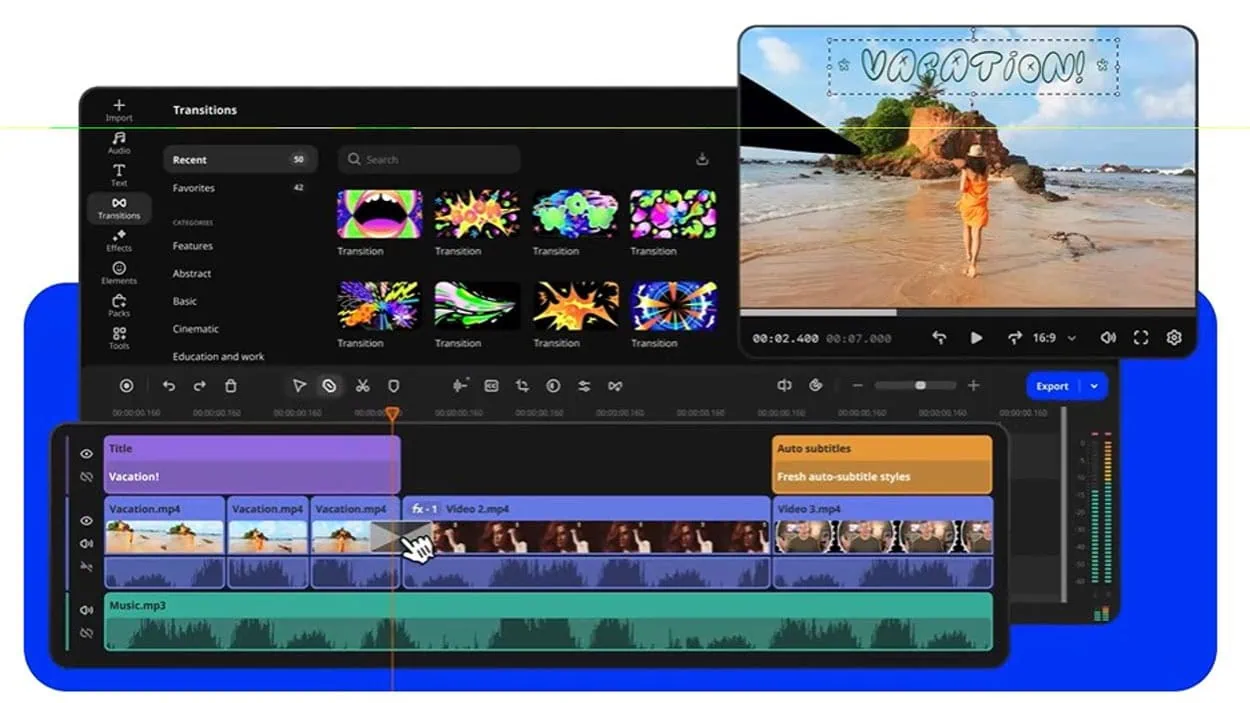
The interface is genuinely fast to learn. Not “fast” in the way software companies always claim, fast as in, a reasonably computer-literate person can import footage, trim clips, add titles, and export something watchable within 20-30 minutes of first opening the app. That’s nothing.
- The timeline is drag-and-drop
- The effects panel doesn’t require a tutorial to navigate
- The export presets are sensibly organized
- Simply selecting “YouTube 1080p” gets the job done
Small thing. Saves real frustration.
A few features that actually stand out:
- AI-powered background removal, introduced in the 2025 update, works surprisingly well on footage with reasonable contrast. Not perfect on complex hair or translucent fabric, but functional for green-screen-free product shots or talking-head videos.
- Motion tracking, available in the full version, lets you pin text or graphics to moving objects in your footage. It’s slower to process than professional tools, but the output is clean enough for social media use.
- Audio handling is decent. The noise reduction tool removes consistent background hum (fan noise, air conditioning) effectively. It struggles with variable noise, like wind or crowd sounds, which is a known limitation across most easy video editing software at this price point.
One feature that doesn’t get nearly enough credit is the built-in stock footage and music library. It’s not the biggest library out there, but it’s royalty-free and solid enough to create a short explainer video without using third-party asset sites. For video-making software aimed at non-professionals, that’s a meaningful convenience.
The Drawbacks
The watermark on exports in the trial version is aggressive. Everything is watermarked until you purchase, which makes genuinely evaluating the tool on real projects harder than it should be. Worth knowing upfront.
On systems with mid-range specs but no dedicated graphics, Movavi Video Editor can experience clear playback lag during longer projects (15+ minutes), particularly when combining multiple tracks, effects, and high-resolution footage without strong hardware acceleration. That’s rarely a dealbreaker for short-form content, but users planning to edit longer projects, such as a 45-minute webinar recording, may notice some workflow slowdowns depending on system specs and project complexity. The software officially recommends a dedicated graphics card for smooth playback, which is fair, but also worth flagging if you’re working on older hardware.
The subscription pricing structure changed in 2025, and, honestly, it takes a moment to figure out. There’s a one-time purchase option and an annual subscription, but the feature sets differ between them, and the pricing page requires some careful reading before committing. Not unreasonably priced for what you get, sits comfortably in the mid-range tier among similar video editing tools, but worth taking five minutes to understand exactly what each plan includes.
Color grading tools are fairly basic. Movavi delivers filters, LUT support, and essential color controls, but users focused on advanced precision or professional-level grading may find the overall toolkit somewhat modest. That isn’t really a flaw so much as a scope decision, though it’s worth stating directly.

How Movavi Holds Up over Time
Short-form reviews rarely talk about how video editing software behaves once the honeymoon period ends. With any new tool, that first week often feels like either chaos or excitement. Week three is more honest.
With Movavi, the workflow stays comfortable, but the scope of the tool becomes clearer over time. It’s a solid choice for short-form projects, including social clips, tutorials, and simple promotional content. It feels less naturally suited for complex, layered work involving multiple tracks, dense effects, and lengthy timelines. Not broken, just noticeably less fluid. It’s not truly a fault, just a purposeful design decision. Movavi isn’t aiming to compete as a pro-level editor, and acting like it is wouldn’t serve anyone well.
Export quality, on the other hand, holds up consistently. The default H.264 output is clean at 1080p, and the preset system means most people never need to touch codec settings manually. For video-making software aimed at non-specialists, that’s exactly the right call, one less thing to worry about when you just need the file out the door.
Who Should and Shouldn’t Use This
So, in practical terms, who is this really for?
Movavi makes genuine sense for:
- Content creators producing short to medium-length videos
- Small businesses making their own marketing materials
- Educators building course content
- Anyone transitioning from phone editing to a proper desktop workflow
For these creators, it holds its place among the easiest-to-use options in the video editing software market.
It’s probably not the right call for:
- Professional video producers
- Anyone doing serious color work
- Editors working on long-form documentary or film projects
- Users on older/lower-spec hardware who need smooth performance
All Things Considered
Movavi Video Editor in 2026 is a solid, slightly imperfect tool that does what it promises for the audience it actually targets. It’s not trying to compete with pro options, and that restraint is, weirdly, one of its better qualities. The AI features added in recent updates are more useful than expected. The performance ceiling is real but manageable if you know it’s there going in.
If you’re somewhere in that large middle ground of video creators, capable enough to want real tools, busy enough to need something that doesn’t require a 40-hour learning curve, it’s worth a serious look. Just go in with accurate expectations, and maybe upgrade your RAM first.